Fingerprint Live Animation
- 4.5
- Rating
- 10.00M
- Installs
- Free
- Price
 Analysis by App-foxy
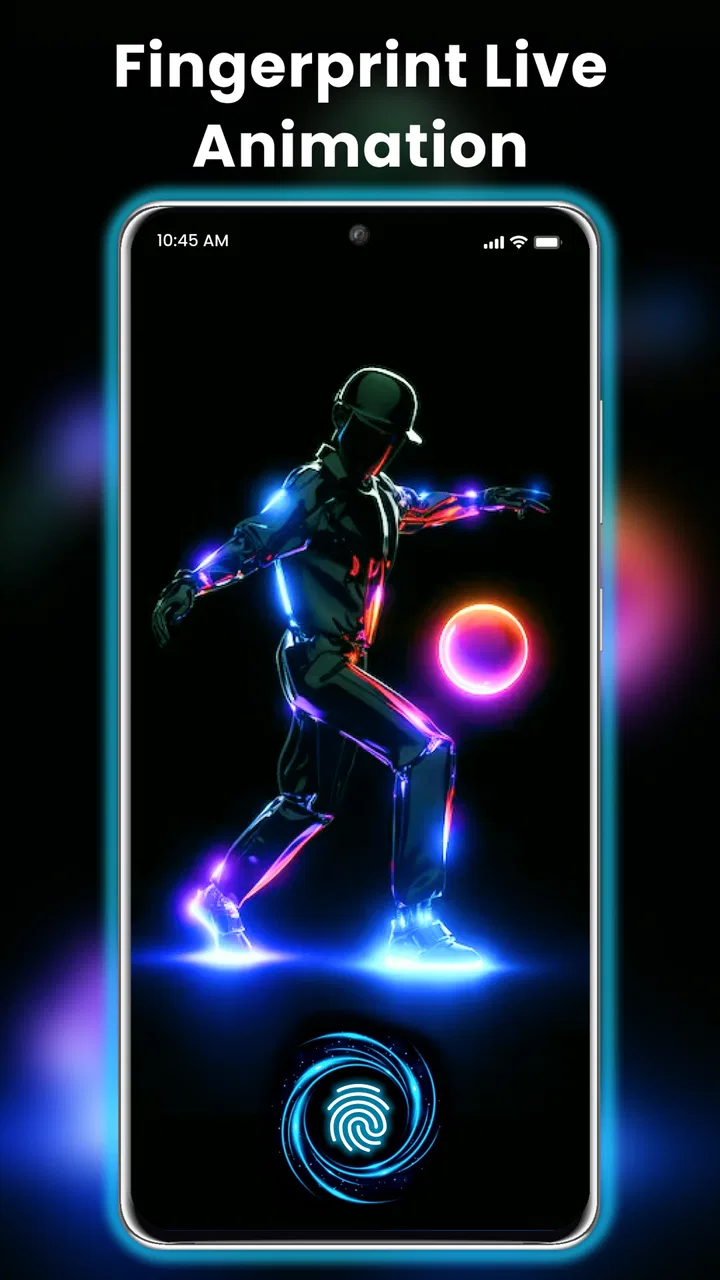
I spent time using Fingerprint Live Animation as a personalization app rather than treating it like a security tool, and that distinction matters from the first minute. Its main appeal is visual: it adds a fingerprint-style animation to the phone experience and pairs that effect with high-definition wallpaper. The result is a more dramatic lock-screen look, especially if you enjoy sci-fi themes, glowing interfaces, or anything that makes an ordinary phone feel a little more custom.
Fingerprint Live Animation is made by Prometheus Interactive LLC and is available free of charge for Android users. It belongs to the personalization category, carries an Everyone age rating, and supports Android 7.0 or later. The current version is 1.41, while optional purchases range from $0.99 to $99.99 per item. I would approach it as a visual customization layer, not as a replacement for the phone’s actual fingerprint authentication.
How I use Fingerprint Live Animation in a normal day
My baseline workflow is simple. I open the app, look through the available fingerprint animation and wallpaper choices, select a combination that fits my screen, and then check how it behaves when I wake the phone. That last step is more important than it sounds. A design can look impressive inside an app preview but feel too bright, too busy, or poorly matched to the icons and clock once it becomes part of everyday use.
You May Also Like

 Blood Strike: 2.5 Anniversary
Blood Strike’s Loadouts Turn Every Drop Into a Tactical Gamble
A close look at Blood Strike’s custom loadouts: how fast access to signature weapons reshapes its battle royale rhythm, rewards preparation, and narrows the gap between fights.

 Pandora - Music & Podcasts
Pandora’s Music Is Easy to Start, but Harder to Recover
Pandora’s strength is its low-effort path from a seed to a station. Its weak spot is how much confidence it asks you to place in connection, setup, and quiet recovery.

 8 Ball Pool
 Is Built on Rivalries, Rematches, and Routine
A close look at the rivalries, rematches, shared routines, and unanswered safety questions that turn a quick pool match into a persistent mobile community.

 Samsung Music
’s Quiet Strength Is Playing What You Already Own
Its reach comes less from spectacle than from dependable access to a personal library. That simplicity is both the app’s strongest retention engine and its ceiling.

 AccuWeather: Weather Radar
AccuWeather Review: A Quick, Clear Forecast for Everyday Decisions
For everyday plans, the best forecast is the one you can understand quickly. AccuWeather makes rain timing, radar, and local conditions easy to act on, with a few trade-offs.

 Hill Climb Racing
Why Hill Climb Racing Still Turns Crashes Into One More Run
A tiny car, a bumpy hill and one more upgrade: Hill Climb Racing keeps resurfacing because its simple chaos makes every near-miss feel personal.
More From Our News Desk



I found the best results came from treating the animation and wallpaper as a pair instead of choosing each one independently. A bright fingerprint effect can disappear against a similarly bright background, while a dark wallpaper gives a luminous effect more room to stand out. Conversely, a very active wallpaper can compete with the animation and make the lock screen feel cluttered. The app is most successful when I use one element as the focus and keep the other restrained.
The store summary emphasizes a fingerprint lock animation effect and HD wallpaper, and that describes the experience accurately at a broad level. I would not install it expecting a complete phone makeover with a new launcher, icon pack, or system-wide redesign. Its value is narrower and more immediate: it changes the visual moment around unlocking and gives the screen a more distinctive identity.
One practical routine is to choose a style for workdays and another for weekends, then switch only when I genuinely want a change. Constantly changing the lock screen can become tiring, particularly when the app presents many visually similar choices. A repeatable habit works better: start with a dark background, test the animation in normal indoor lighting, and keep the design for a day before deciding whether it is comfortable.
That approach also helps answer an important question: does it actually improve unlocking? In my experience, it improves the presentation of unlocking, not the underlying process. The phone’s real biometric behavior still comes from the device and its operating system. The animation should therefore be judged as decoration and feedback, not as extra protection. Anyone looking for stronger phone security should use the built-in fingerprint, PIN, password, or other system options instead.
Settings worth checking before settling on a design
The first setting I would check is whether the chosen visual style remains readable with the phone’s normal lock-screen information. Time, notifications, and other system elements still need to be easy to see. A beautiful effect is not useful if it places glowing lines directly behind the clock or makes notifications harder to scan. I prefer to test the screen with a few real notifications rather than judging it from an empty preview.
I also pay attention to how the animation feels in different lighting. A design that looks subtle in a dark room may become difficult to notice outdoors, while an intense effect can feel excessive at night. This is one reason I would avoid choosing purely from screenshots. The phone’s brightness, display type, and wallpaper contrast all influence the final impression, so the most attractive option on one device may not be the most comfortable on another.
Wallpaper choice deserves more attention than the word “HD” might suggest. Higher-resolution artwork can look crisp, but clarity alone does not guarantee a good lock screen. I look for a background with open space around the fingerprint area and avoid images with strong details where system text is displayed. This is a small design decision, yet it makes the app feel more polished than simply picking the most colorful image.
Another useful check is whether the app’s visual behavior fits the way I unlock my phone. If I usually tap the screen repeatedly, glance at notifications, and unlock quickly, a long or visually forceful effect may become annoying. If I enjoy showing the phone to friends or like a more theatrical lock screen, the same effect can feel worthwhile. The right choice depends less on technical specifications and more on how often I see the screen during the day.
Because this is a free app with optional in-app purchases, I would also take a moment to understand which choices are immediately available and which are presented as paid extras before building a whole theme around one design. I do not consider that unusual for a personalization app, but it can be frustrating to find a favorite style and only later discover that it requires a purchase. I recommend exploring the free selection first and deciding whether the overall look is good enough before spending anything.
The purchase range stretches from $0.99 to $99.99 per item, so I would be especially careful with impulse decisions. The highest-priced option is not automatically better for a lock screen, and a wallpaper or animation is easy to replace. My rule would be simple: use the free experience long enough to see whether the app remains part of my routine, then consider only the specific visual item I actually want.
Faster patterns for people who change their screen often
Experienced users can make the app less fiddly by creating a small selection of reliable combinations instead of browsing from scratch every time. I would keep one understated design for daily use, one high-contrast option for outdoor visibility, and one more dramatic style for occasions when appearance matters more than simplicity. This turns customization into a repeatable workflow rather than an endless search through similar previews.
A helpful shortcut is to decide on the wallpaper mood first. For example, I might start with a dark, low-detail background and then select a fingerprint animation that adds color or motion. This is faster than choosing an animation first and trying to force every wallpaper to work with it. It also produces more consistent results because the background controls the overall visual balance.
I would also test the selected design after a normal phone restart or after returning to the device later, rather than assuming the first preview tells the whole story. The important question is whether the experience remains clear when I am in a hurry. A lock screen that looks good during deliberate testing may feel distracting when I only want to check a message and move on.
For a family member who is less interested in customization, I would recommend one calm wallpaper and a restrained animation rather than the most elaborate option. That makes the app approachable and avoids turning the lock screen into a constant source of visual noise. For a teenager or someone who enjoys personal style, I would do the opposite: experiment with stronger color contrasts, but still keep the notification area readable.
A realistic everyday scenario would be preparing for a trip. I might choose a darker wallpaper with a clear fingerprint effect before traveling because it is easier to read in changing surroundings and gives the phone a recognizable look. Once I return to work, I could switch to a quieter design that does not compete with notifications during meetings. The benefit is not productivity in the usual sense; it is having a quick, visible way to match the phone to a situation.
Another repeatable habit is to judge the app after several unlocks rather than after one impressive demonstration. The animation is part of a repeated action, so its novelty can fade. If I still like the effect after using the phone normally, it has earned a place on the device. If I start wishing it would disappear, that is a sign the design is too elaborate for everyday use, regardless of how attractive it looked initially.
Where the app’s advanced limits become noticeable
The biggest limitation is that this is focused personalization, not a full replacement for the phone’s lock-screen system. It does not turn the device into a completely different operating environment. Users who want deep control over widgets, icon layouts, transitions, always-on display behavior, or system typography may find a dedicated launcher, theme engine, or the phone maker’s own customization tools more suitable.
The fingerprint theme can also create a misleading impression if it is presented as though the animation itself verifies identity. I would make sure anyone using the phone understands the difference between a decorative fingerprint graphic and genuine biometric authentication. The visual effect may appear at the moment of unlocking, but it should not be treated as evidence that the app is handling the fingerprint sensor or improving security.
Compatibility expectations are another point to keep realistic. The app supports Android 7.0 and later, which covers a broad range of devices, but Android phones do not all handle lock-screen visuals in exactly the same way. Screen proportions, manufacturer interfaces, display cutouts, and system behavior can affect how a wallpaper or animation feels. I would test it on the actual phone rather than assuming a preview represents every device equally.
Performance and battery are also worth considering without exaggerating the issue. Animated visuals naturally ask more of a device than a static background, and older or less powerful phones may make the effect feel less smooth. I would choose a simpler animation if the phone already feels busy or if the lock screen takes longer than expected to appear. For someone who values maximum battery endurance and minimal background activity, a static wallpaper is the more sensible alternative.
There is a similar trade-off with attention. The app is designed to be noticed, which is precisely why it can be enjoyable. But a noticeable effect is not always helpful when I am checking a notification quickly, unlocking during a conversation, or using the phone in a dark bedroom. I would skip the most intense styles if I want the device to remain quiet and unobtrusive.
The app’s popularity suggests that the concept has broad appeal: it has a 4.4 average from around 106 thousand ratings and more than 10 million installs. Those figures tell me that the visual idea resonates with many Android users, but they do not remove the personal nature of the decision. A popular animation can still be wrong for someone who prefers a clean, nearly invisible lock screen.
It is also worth remembering that the app was released on October 16, 2024, so I would keep my expectations centered on its current visual purpose rather than assuming it replaces years of built-in Android customization. The developer is Prometheus Interactive LLC, and the app’s current version is 1.41. I see it as a focused tool that should be judged by how well it decorates the unlocking moment, not by whether it offers every feature found in broader personalization suites.
Who should use it, and who should choose something else?
I think Fingerprint Live Animation is a good fit for someone who wants a quick visual change without redesigning the whole phone. It suits users who enjoy neon effects, futuristic graphics, and wallpapers that make the lock screen feel more personal. It is also a reasonable choice for people who want to experiment at no initial cost before deciding whether a more elaborate customization setup is worth the effort.
I would recommend it less strongly to anyone who wants a completely minimal interface, depends on instant unlocking, or is very sensitive to visual distraction. A static wallpaper from the phone’s own settings may be better for those users. Someone seeking advanced layout control should look toward a launcher or a system theme tool, while someone focused on security should stay with the operating system’s trusted biometric and passcode features.
Parents may appreciate the Everyone rating, but I would still explain what the app does before installing it on a child’s device. The age classification describes suitability, not whether every optional purchase is appropriate for a particular household. Since purchases are available, checking the device’s purchase controls is a sensible general precaution, especially when several people share a phone or tablet account.
My verdict after making it part of a repeatable routine
I like Fingerprint Live Animation most when I treat it as a small design accent rather than a major phone upgrade. The strongest experience comes from choosing a readable wallpaper, matching the animation to the background, and testing the result in real conditions. Those habits make the app feel more intentional and prevent the lock screen from becoming a collection of competing effects.
The key trade-off is simple: more visual impact usually means less calm and less immediacy. If I want my phone to feel expressive, the fingerprint animation gives the unlocking moment personality. If I want the screen to disappear into the background, a normal static wallpaper is more efficient. Neither choice is universally better; they serve different habits.
After reviewing it, I would recommend trying the free options first, selecting one practical everyday combination, and living with it before considering an optional purchase. That approach reveals whether the animation remains enjoyable beyond the first few minutes. For the right user, this is an easy way to give an Android lock screen a futuristic touch. For everyone else, especially people seeking true security features or deep system customization, it is better understood as a decorative extra rather than a complete solution.
FAQs for Fingerprint Live Animation
01What is Fingerprint Live Animation and how does it work?
Fingerprint Live Animation is an app that adds dynamic animations to your fingerprint scanner. When you unlock your phone, you’ll experience a visually engaging animation, enhancing the overall user experience. The app offers multiple animation styles and is compatible with most Android devices that feature a fingerprint reader.
02Does Fingerprint Live Animation affect my phone's battery life?
While Fingerprint Live Animation does add a layer of visual flair, it is designed to be efficient. The animations are brief and optimized to minimize battery consumption. However, if you're concerned about battery life, you can adjust animation settings or limit their use to specific situations.
03Is my personal data safe with Fingerprint Live Animation?
Yes, Fingerprint Live Animation emphasizes user privacy. The app doesn't store or share your fingerprint data, as it only enhances the visual effects during the unlocking process. Always ensure you download the app from a trusted source to maintain privacy and security.
04Can I customize the animations in Fingerprint Live Animation?
Absolutely! Fingerprint Live Animation offers a variety of animation styles and effects, allowing you to customize the look to your liking. You can easily switch between different animations and update your preferences through the app's user-friendly interface.
05Is Fingerprint Live Animation compatible with all devices?
Fingerprint Live Animation is compatible with most Android devices that have a fingerprint scanner. However, it's always a good idea to check the app's specifications and user reviews to ensure it works smoothly on your specific model before downloading.
Pros
- Smooth and dynamic animations enhance user experience.
- Intuitive interface makes navigation easy.
- Customizable settings for a personalized touch.
- Low battery consumption despite high-quality graphics.
- Regular updates with new animations and features.
Cons
- Limited free features; many are premium.
- Ads can be intrusive during use.
- Requires internet for some functionalities.
- May not support older devices smoothly.
- Occasional crashes reported by some users.

Fingerprint Live Animation
Gallery